Multi-Camera Tracking for Real-Time Person Location
Multi-Camera Tracking in Axxon One is an AI-powered video analytics feature for human detection and tracking across multiple cameras. It helps maintain a person’s track as they move from one camera view to another and displays their current location on an interactive map in real time.
Using a neural network–based appearance-matching algorithm, Axxon One compares a person’s visual similarity between camera views and continues the track when the person appears in another camera. The system links the detections and displays the person’s position on the map, helping operators keep spatial context across the monitored area and reducing the risk of losing track continuity in multi-camera environments.
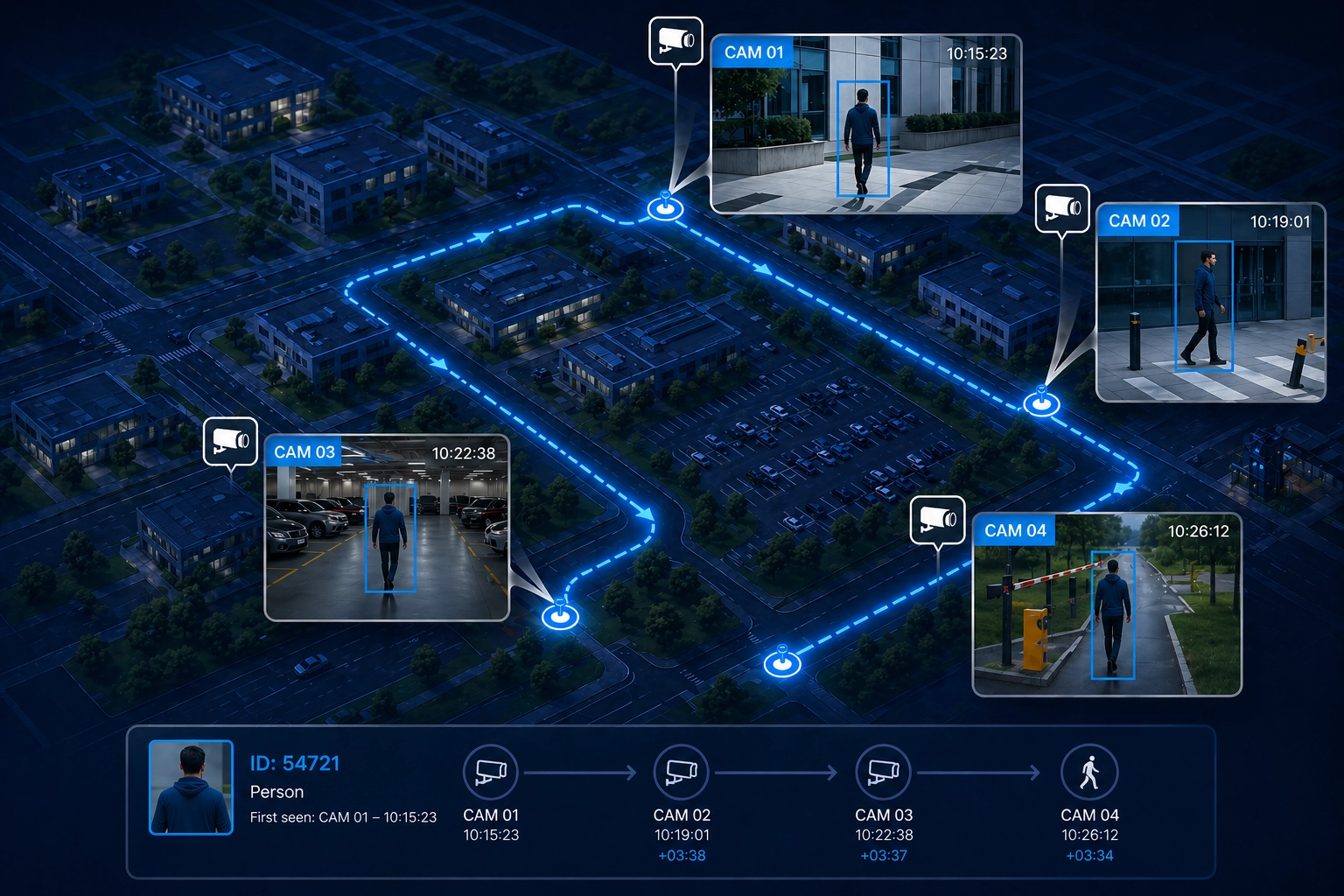
How Multi-Camera Tracking Works
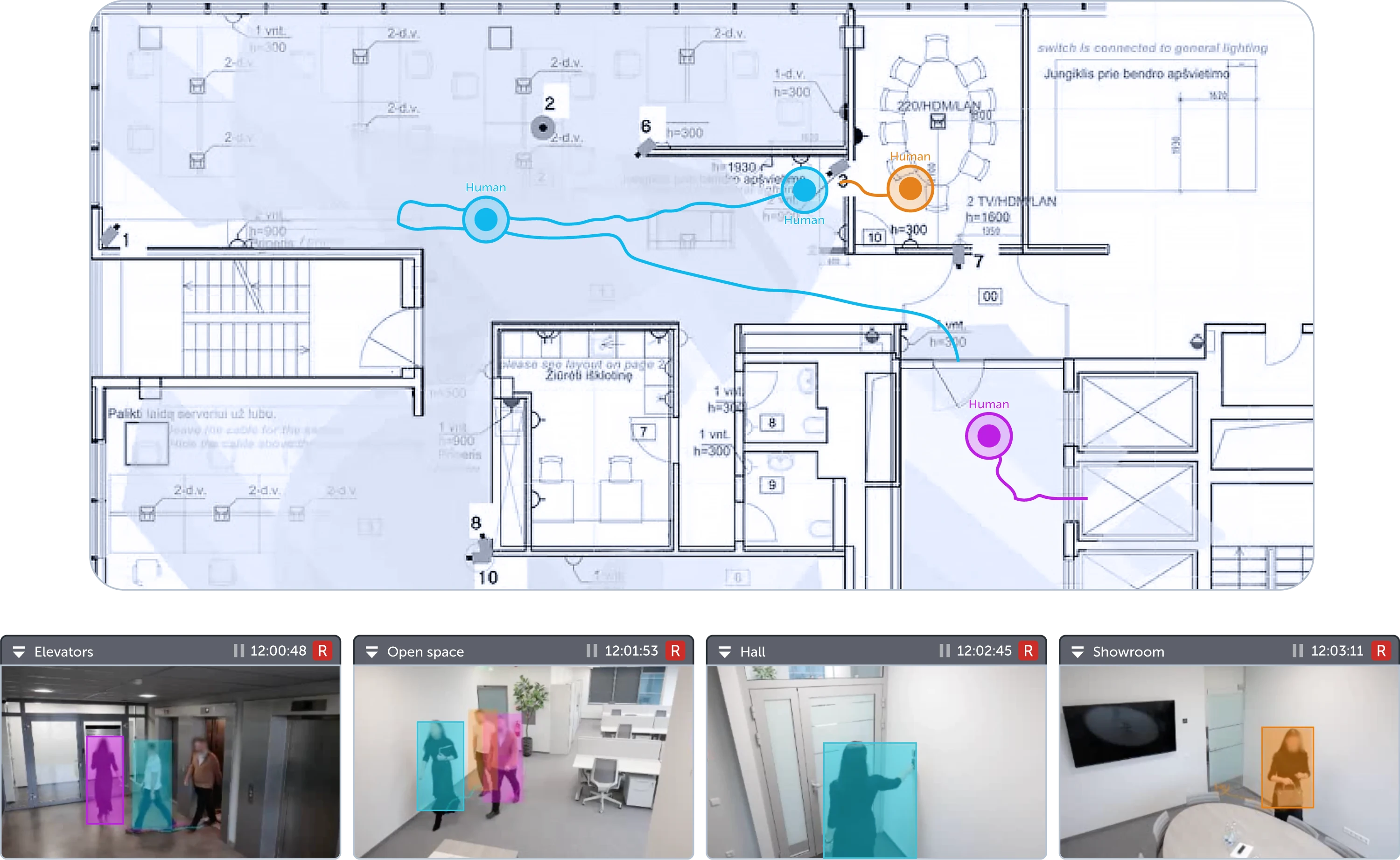
Multi-Camera Tracking uses cameras attached to an interactive map. The cameras are calibrated to the monitored area, allowing the system to associate video detections with positions on the map.
As a person moves through areas covered by different cameras, Axxon One uses similarity-based matching to link detections between camera views. The system then shows the person’s current position on the interactive map in real time.
Human Detection and Tracking Across Cameras
Multi-Camera Tracking supports human detection and tracking use cases where operators need to see a person’s current position across configured cameras. The feature is focused on real-time map-based tracking: it helps preserve continuity between camera zones and shows the person’s current location on the interactive map.
Users configure cameras on an interactive map and enable the required neural trackers. Once configured, the system can display a person’s track in the camera window and their current location on the map as the person moves through areas covered by configured cameras.
Typical usage includes:
- Maintaining a person’s track when they move between cameras.
- Displaying a person’s current location on an interactive map.
- Helping operators keep spatial context during live monitoring.
- Reducing the risk of losing track continuity across adjacent camera views.
- Supporting real-time situational awareness in multi-camera environments.
With AI-powered multi-camera tracking, security teams can maintain visibility across complex environments and make better-informed decisions during live monitoring.
Benefits of Multi-Camera Tracking in Axxon One

Real-time person location on a map
Axxon One displays a person’s current location on an interactive map in real time, helping operators understand where the person is within the monitored area.

Track continuity between cameras
The system helps maintain the person’s track when they move from one camera view to another, reducing the risk of losing spatial context.

Human detection and tracking support
Multi-Camera Tracking supports human detection and tracking scenarios where operators need to follow a person’s position across configured cameras.

Improved situational awareness
By combining video analytics with map-based visualization, Axxon One gives operators a clearer real-time view of person movement across monitored areas.

Reduced monitoring complexity
The system helps operators maintain context across multiple cameras without relying only on manual visual matching between separate video streams.
Applications of Multi-Camera Human Tracking
Multi-Camera Tracking can be applied in environments where continuous monitoring across multiple cameras is required.

Retail and shopping centers
Use customer tracking to follow movement across entrances, sales floors, corridors, parking areas, and shared spaces. This helps security teams understand movement routes across multiple camera zones.
Safe City and public safety
Support human detection and tracking across streets, squares, transportation hubs, and public areas where real-time situational awareness is critical.

Critical infrastructure
Monitor movement across restricted zones, perimeters, and high-security sites with map-based visualization of object locations.

Airports and transport facilities
Track people through large multi-camera environments, including terminals, platforms, and parking areas.

Corporate campuses
Improve situational awareness across office buildings, entrances, parking areas, and shared spaces.
Try Axxon One for Free Today
See how the intelligent VMS can meet your requirements for customer tracking, human detection and tracking, and vehicle detection and tracking across multiple cameras.
Try it nowFrequently Asked Questions
What is human detection and tracking?
Human detection and tracking uses video analytics to detect people and keep their location context across a monitored area. In Axxon One, Multi-Camera Tracking links person detections between configured cameras and displays the person’s current location on an interactive map in real time.
Does Axxon One support human detection and tracking across cameras?
Yes. Axxon One Multi-Camera Tracking supports real-time human detection and tracking across configured cameras by maintaining a person’s track when they move from one camera view to another.
Does Multi-Camera Tracking work with vehicles?
No. In the current release, Multi-Camera Tracking is designed for people tracking. It does not support vehicle tracking.
Is Multi-Camera Tracking the same as customer tracking?
No. Customer tracking usually refers to retail customer journey analytics. Axxon One Multi-Camera Tracking is focused on maintaining a person’s track between cameras and showing their current location on a map.
Can the operator click on a person and make the system follow them automatically?
Not in the current release. The current version helps maintain track continuity between cameras and displays the person’s current location on the map. Automatic camera switching and selected-person tracking are not available yet.
Can Multi-Camera Tracking build a person’s full route in the archive?
In archive mode, Similarity Search can show which cameras detected a person with a similar appearance and when they were detected. However, it does not automatically connect these detections into a continuous route or timeline across cameras. This functionality is planned for future releases of Multi-Camera Trackig.
What does Multi-Camera Tracking show on the map?
It shows people’s current location on an interactive map based on configured and calibrated cameras.